Prepared by Metin KARAL – Review Editor
We research, compare, and if applicable, rate the products. We know the importance of Trusted Reviews.
Nothing on this site is sponsored. We only make money if you purchase a product through our links, at no extra cost to you.
For decades, computer peripherals have been designed with right-handed users in mind. The standard mouse shape, button placement, and ergonomics all assume that the majority of people will operate it with their right hand. But what about the 10–12% of the global population who are left-handed? If you are not a “lefty”, you probably never understand how it is difficult to use standart mouse. For lefties, using a traditional mouse can feel awkward, inefficient, and even physically uncomfortable over time.
A left-handed mouse is designed to fix this imbalance. It’s not just a mirrored version of a right-handed mouse. It’s a tool that lets left-handed users work, play, and create with the same comfort and ease as anyone else.
Key Benefits for Left-Handed Users
- Natural Ergonomics: Left-handed mice are shaped to fit the natural curve of the left hand. This reduces strain on the wrist and fingers, helping prevent repetitive stress injuries like carpal tunnel syndrome.
- Improved Productivity: When the mouse feels natural to hold, tasks like clicking, dragging, and scrolling become faster and more precise. Left-handed professionals (like designers, programmers, office workers) can maintain efficiency without constantly adjusting to a right-hand–biased tool.
- Better Gaming Performance: For left-handed gamers, ambidextrous or left-handed gaming mice provide customizable buttons and high-DPI sensors that allow them to compete at the same level as right-handed players. No more awkward hand positioning or limited control.
- Inclusivity & Confidence: Using a mouse designed for your dominant hand isn’t just about comfort. It is about feeling included. Left-handed users often adapt to right-handed tools out of necessity, but having a device tailored for them boosts confidence and makes computing more enjoyable.
- Accessibility for Injuries or Conditions: Even right-handed people who suffer injuries or conditions that limit right-hand use can benefit from left-handed mice. They provide an alternative that keeps users connected and productive.
Comparison of Left-Handed & Ambidextrous Mice
| Mouse | Key Strength | Best For | Unique Feature |
|---|---|---|---|
| Logitech Lift Vertical Ergonomic | Outstanding ergonomic comfort with a vertical grip, reduces wrist strain, long 2-year battery life, eco-friendly build | Office work, long hours, health-conscious users | Vertical design with 57° handshake angle |
| Logitech Signature M650 L | Reliable everyday productivity with silent clicks, SmartWheel scrolling, and affordable pricing | Students, professionals, casual users | SmartWheel scrolling + quiet operation |
| Razer Viper 8KHz | Ultra-fast performance with 8,000 Hz polling rate, lightweight build, and 20,000 DPI sensor | Competitive gaming, esports | 8,000 Hz polling rate (fastest available) |
| Perixx PERIMICE-713L | Budget-friendly ergonomic option with vertical grip, wireless convenience, and simple DPI adjustment | Entry-level ergonomic users, budget-conscious buyers | Affordable vertical mouse specifically for left-handed users |
| ELECOM EX-G Trackball | Thumb-operated trackball for precision, reduces wrist movement, long 27-month battery life | Precision tasks, design work, limited desk space | True left-handed trackball design |
| Kensington Pro Fit Ergo Trackball | Premium productivity tool with vertical trackball, dual wireless connectivity, rechargeable USB-C battery | Professionals, heavy computer users | Vertical + trackball + USB-C charging |
Key Takeaways
- Logitech Lift → Best for health and ergonomics. Long battery life and eco-friendly materials make it ideal for professionals who spend hours at a desk.
- Logitech M650 L → Best for everyday productivity. Because, it is affordable, quiet, and practical. It is perfect for students or office workers.
- Razer Viper 8KHz → Best for gaming. Its unmatched 8,000 Hz polling rate and ultra-lightweight design give competitive players a serious edge.
- Perixx PERIMICE-713L → Best budget ergonomic option. A simple, affordable way to try vertical mice without investing in premium models.
- ELECOM EX-G → Best for precision and space-saving. The left-handed trackball design reduces wrist movement and is excellent for design or CAD work.
- Kensington Pro Fit Ergo → Best premium trackball. Combines vertical ergonomics with a rechargeable battery and dual wireless connectivity, making it versatile and professional.
#1 Logitech Lift Vertical Ergonomic Mouse (Left-Handed)
Specs
| Spec | Detail |
|---|---|
| Design | Vertical ergonomic, left-handed |
| Grip Angle | 57° natural handshake position |
| Connectivity | Wireless (Bluetooth + USB receiver) |
| Battery Life | Up to 2 years (1× AA battery) |
| Sensor | Advanced optical tracking |
| DPI Range | 400–4000 DPI (adjustable) |
| Buttons | 4 customizable buttons + scroll wheel |
| Compatibility | Windows, macOS, Linux, ChromeOS, iPadOS |
| Weight | 125 g |
| Colors | Graphite, Rose, Off-White |
Overview
The Logitech Lift Vertical Ergonomic Mouse is designed specifically for left-handed users who spend long hours at the computer. The vertical design places the hand in a comfortable handshake position which is helping to reduce wrist strain and improve overall ergonomics. Unlike traditional mice, it doesn’t force your wrist to twist inward. Instead, it supports a relaxed grip that feels natural and comfortable. I can clearly say that it is one of the best left-handed mice on the market.
Features & Performance
- Vertical design: Keeps the wrist aligned, reducing tension and fatigue.
- Silent clicks: Ideal for quiet offices or shared workspaces.
- SmartWheel scrolling: Smooth, precise scrolling for documents and web browsing.
- Customizable buttons: Assign shortcuts for productivity tasks.
- Cross-platform support: Works seamlessly across multiple operating systems.
- Compact size: Fits smaller to medium hands comfortably.
- Eco-friendly build: Made with certified post-consumer recycled plastic.
Performance is consistent and reliable. The optical sensor tracks smoothly across most surfaces, and the wireless connection is stable with no noticeable lag. Switching between devices is easy thanks to Logitech’s Easy-Switch technology, which lets you pair with up to three devices and toggle between them instantly.

Why We Liked It / User Experience
If you did not used vertical mouse before, you might find it awkward (As I did when I first started to use). But as you continue to use it, your wrist stays relaxed, your fingers rest naturally on the keys, and long hours at the computer feel less exhausting. The Logitech Lift stands out because it genuinely feels designed for left-handed users, rather than simply being a mirrored version of a right-handed model.
For professionals who spend hours working on spreadsheets, coding, or creative design, this mouse is a game-changer. It’s also perfect for students or remote workers who want comfort without sacrificing performance. The customizable buttons add efficiency, letting you set shortcuts for copy-paste, zoom, or even gaming commands.
In short, you’d prefer this mouse if you value comfort, health, and productivity. It’s not just about clicking. It is about protecting your wrist and making your daily work smoother.
✅ Pros
- Ergonomic vertical design reduces wrist strain
- Long battery life (up to 2 years)
- Quiet clicks for distraction-free work
- Easy-Switch for multiple devices
- Eco-friendly materials
- Compact and stylish design
❌ Cons
- Slight learning curve for users new to vertical mice
- Best suited for small to medium hands (may feel tight for very large hands)
Verdict
The Logitech Lift Vertical Ergonomic Mouse (Left-Handed) is the best choice for left-handed professionals who care about comfort and long-term health. It combines ergonomic design, reliable performance, and thoughtful features that make everyday computing easier. If you’re left-handed and spend hours at your desk, this mouse is worth choosing over traditional designs.
#2 Logitech Signature M650 L (Left-Handed, Full Size)
Specs
| Spec | Detail |
|---|---|
| Design | Ergonomic, left-handed, full-size |
| Connectivity | Wireless (Bluetooth + USB receiver) |
| Battery Life | Up to 2 years (1× AA battery) |
| Sensor | Advanced optical tracking |
| DPI Range | 400–2000 DPI |
| Buttons | 5 (including customizable side buttons) |
| Scroll Wheel | SmartWheel with precision scrolling |
| Compatibility | Windows, macOS, Linux, ChromeOS, iPadOS |
| Weight | 111 g |
| Colors | Graphite, Rose, Off-White |
Overview
The Logitech Signature M650 L is a left-handed mouse built for everyday use. Unlike vertical designs, this one looks more traditional but is shaped specifically for left-hand comfort. It’s a full-size mouse, making it a great fit for medium to large hands. Logitech designed it to balance productivity, comfort, and affordability, making it one of the best left-handed mouse options available.
Features & Performance
- Silent clicks: Perfect for quiet environments.
- SmartWheel scrolling: Switches automatically between line-by-line precision and fast scrolling.
- Customizable side buttons: Useful for shortcuts like copy-paste or browser navigation.
- Wireless freedom: Connect via Bluetooth or USB receiver.
- Long battery life: Up to 2 years on a single AA battery.
- Cross-platform support: Works across multiple operating systems.
- Comfort-focused design: Curved shape supports the hand naturally.
Performance is smooth and reliable. The sensor tracks accurately on most surfaces, and the wireless connection is stable. The SmartWheel is a standout feature, giving you both precision and speed depending on what you’re doing.

Why We Liked It / User Experience
The M650 L feels familiar yet tailored for left-handed users. It doesn’t require the adjustment that vertical mice do, so it’s easy to pick up and use right away. The comfort is noticeable. The curve of the mouse fits the hand naturally, and the side buttons are positioned exactly where your thumb expects them.
This mouse is ideal for professionals who want a reliable daily driver. It’s also great for students or casual users who want comfort without spending too much. The customizable buttons add efficiency, letting you set shortcuts for your most-used tasks.
You will prefer this mouse if you want a balance of comfort, simplicity, and productivity. It’s not flashy, but it’s dependable, ergonomic, and designed with left-handed users in mind.
✅ Pros
- Ergonomic design for left-handed users
- Silent clicks for quiet workspaces
- SmartWheel scrolling adapts to your needs
- Long battery life (up to 2 years)
- Affordable compared to premium ergonomic models
❌ Cons
- Limited DPI range compared to gaming mice
- Best suited for medium to large hands
Verdict
The Logitech Signature M650 L (Left-Handed) is a practical, everyday mouse that delivers comfort and reliability. It’s perfect for left-handed users who want a traditional design with modern features. If you’re looking for a dependable mouse for work or study, this one is an excellent choice.
#3 Razer Viper 8KHz (Ambidextrous Gaming Mouse)
Specs
| Spec | Detail |
|---|---|
| Design | Ambidextrous, lightweight gaming mouse |
| Connectivity | Wired (USB) |
| Sensor | Razer Focus+ Optical Sensor |
| DPI Range | Up to 20,000 DPI |
| Polling Rate | 8,000 Hz (fastest available) |
| Buttons | 8 programmable buttons |
| Switches | Razer Optical Mouse Switches (70M clicks lifespan) |
| Weight | 71 g |
| Lighting | Razer Chroma RGB |
| Compatibility | Windows, macOS |
Overview
The Razer Viper 8KHz is built for speed and precision. It’s one of the fastest gaming mice in the world, thanks to its record-breaking 8,000 Hz polling rate. Its ambidextrous design makes it equally comfortable for left-handed and right-handed players, which is rare in gaming gear. For competitive gamers, especially those who play fast-paced titles, this mouse delivers unmatched responsiveness.
Features & Performance
- Ambidextrous design: Comfortable for both left- and right-handed users.
- Ultra-fast polling rate: 8,000 Hz ensures near-instant response times.
- High DPI sensor: Up to 20,000 DPI for extreme precision.
- Lightweight build: At just 71 g, it glides effortlessly across the mousepad.
- Durable switches: Optical switches rated for 70 million clicks.
- Customizable RGB lighting: Syncs with Razer Chroma setups.
- Mac compatibility: Plug-and-play on macOS. Advanced customization (macros, RGB profiles, DPI settings) requires Razer Synapse software, which is available for Mac.
Performance is where the Viper 8KHz shines. The ultra-high polling rate ensures every movement is registered instantly, giving competitive gamers an edge. The lightweight design makes it easy to maneuver, especially in FPS or MOBA games.

Why We Liked It / User Experience
The Viper 8KHz feels like a tool built for serious gamers. For left-handed users, the ambidextrous shape is a huge advantage and no awkward grip, no compromise. The speed is noticeable right away. Movements feel sharp, clicks are instant, and the mouse never lags behind your actions.
On Mac, it works smoothly out of the box. If you install Razer Synapse, you unlock full customization, including DPI tuning and RGB lighting profiles. This makes it a strong option for Mac gamers who want both performance and personalization.
✅ Pros
- Ambidextrous design works perfectly for left-handed gamers
- Ultra-fast 8,000 Hz polling rate
- Lightweight and easy to maneuver
- High DPI sensor for precision
- Durable optical switches
- Mac-compatible with Synapse software
❌ Cons
- Wired only (no wireless option)
- May feel too light for users who prefer heavier mice
- Premium price compared to budget gaming mice
Verdict
The Razer Viper 8KHz is one of the best gaming mice available for left-handed users. Its ambidextrous design, ultra-fast response time, and lightweight build make it a top choice for competitive play.
Unique Feature Note: None of the other mice in this list offer an 8,000 Hz polling rate. This makes the Viper 8KHz the fastest and most responsive option, standing out as the performance champion among left-handed and ambidextrous mice.
#4 ELECOM EX-G Left-Handed Trackball Mouse
Specs
| Spec | Detail |
|---|---|
| Design | Ergonomic, left-handed, thumb-operated trackball |
| Connectivity | 2.4 GHz wireless (USB receiver) |
| Trackball Size | 34 mm |
| DPI Settings | Adjustable: 750 / 1500 |
| Buttons | 6 programmable buttons + scroll wheel with tilt |
| Battery Life | Up to 27 months (1× AA battery) |
| Range | Up to 10 m (32.8 ft) |
| Compatibility | Windows 11/10/8.1/7, macOS X 10.12 or later |
| Weight | ~150 g |
| Options | Red ball or black ball variants |
Overview
The ELECOM EX-G Left-Handed Trackball Mouse is a rare find: a trackball designed specifically for left-handed users. Instead of moving the entire mouse, you control the cursor with your thumb on the 34 mm ball. This reduces wrist movement and makes it ideal for users who want comfort, precision, and less desk space usage.
Features & Performance
- Thumb-operated trackball: Smooth, accurate control without moving the mouse.
- Ergonomic left-hand design: Sculpted shape supports the natural contours of the left hand.
- Wireless freedom: 2.4 GHz USB receiver with up to 10 m range.
- Customizable buttons: Six programmable buttons plus tilt scroll wheel.
- Adjustable DPI: Switch between 750 and 1500 DPI for precision or speed.
- Mac compatibility: Works out of the box on macOS; customization available via ELECOM software.
- Battery efficiency: Runs up to 27 months on a single AA battery.
Performance is smooth and reliable. The trackball offers precise control, especially useful for design work or users with limited desk space. The wireless connection is stable, and the customizable buttons add productivity.

Why We Liked It / User Experience
The EX-G feels unique compared to traditional mice. For left-handed users, it’s a breakthrough, because most trackballs are right-handed only. The thumb control is intuitive, and once you get used to it, you’ll notice less wrist strain and smoother navigation.
It’s especially useful for people who work long hours or have wrist issues. Unlike vertical mice (like the Logitech Lift), the EX-G reduces wrist movement entirely by shifting control to the thumb. You’d prefer this mouse if you want precision, comfort, and a trackball design that saves desk space.
✅ Pros
- True left-handed trackball design
- Reduces wrist movement and strain
- Long battery life (up to 27 months)
- Wireless with stable connection
- Customizable buttons for productivity
- Mac-compatible
❌ Cons
- Learning curve if you’ve never used a trackball
- Bulkier than standard mice
- Limited DPI compared to gaming mice
Verdict
The ELECOM EX-G Left-Handed Trackball Mouse is one of the best options for left-handed users who want a trackball. Its ergonomic design, long battery life, and precise thumb control make it stand out from other mice. If you’re left-handed and want comfort with minimal wrist movement, this mouse is a top choice.
#5 Perixx PERIMICE-713L Ergonomic Vertical Mouse (Left-Handed)
Specs
| Spec | Detail |
|---|---|
| Design | Vertical ergonomic, left-handed |
| Connectivity | Wireless (2.4 GHz USB receiver) |
| Battery Life | Up to 6 months (2× AAA batteries) |
| Sensor | Optical tracking |
| DPI Settings | Adjustable: 1000 / 1600 |
| Buttons | 6 (including forward/backward side buttons) |
| Compatibility | Windows 7/8/10/11, macOS (basic functions) |
| Weight | ~120 g |
| Finish | Matte black plastic |
Overview
The Perixx PERIMICE-713L is a budget-friendly vertical mouse designed specifically for left-handed users. With its ergonomic comfort and budget-friendly price, it’s an excellent entry-level choice for those interested in trying a vertical mouse without committing to higher-end models like the Logitech Lift.
Features & Performance
- Vertical design: Keeps the wrist in a natural handshake position.
- Wireless connection: Stable 2.4 GHz USB receiver with plug-and-play setup.
- Adjustable DPI: Switch between 1000 and 1600 DPI for everyday tasks.
- Side buttons: Forward and backward buttons for easy web navigation.
- Mac compatibility: Works on macOS, though advanced button customization is limited.
- Affordable price: One of the most budget-friendly left-handed ergonomic mice available.
Performance is reliable for everyday use. The sensor tracks smoothly, though it’s not designed for high-speed gaming. The vertical grip reduces wrist strain, making it a solid choice for office work, browsing, and general productivity.

Why We Liked It / User Experience
The PERIMICE-713L is appealing because it makes ergonomic design accessible. For left-handed users, it’s often hard to find affordable options, and this mouse fills that gap. The vertical grip feels comfortable, and while it doesn’t have advanced features like multi-device pairing or premium materials, it delivers the essentials.
You’d prefer this mouse if you want an affordable way to try vertical ergonomics without spending too much. It’s practical, comfortable, and designed specifically for left-handed users.
✅ Pros
- Affordable price compared to premium models
- Ergonomic vertical design reduces wrist strain
- Wireless with stable connection
- Forward/backward buttons for navigation
- Easy plug-and-play setup
❌ Cons
- Shorter battery life (6 months vs. Logitech Lift’s 2 years)
- Limited DPI range
- Basic build quality compared to premium mice
- Limited customization on macOS
Verdict
The Perixx PERIMICE-713L is a great budget option for left-handed users who want ergonomic comfort without a high price tag. While it lacks the advanced features of premium models, it delivers solid performance for everyday tasks. If you’re left-handed and curious about vertical mice, this is an excellent starting point.
#6 Kensington Pro Fit Ergo Vertical Wireless Trackball (Left-Handed)
Specs
| Spec | Detail |
|---|---|
| Design | Vertical ergonomic, left-handed, thumb-operated trackball |
| Connectivity | Wireless (2.4 GHz USB receiver + Bluetooth) |
| Trackball Size | 34 mm |
| DPI Settings | Adjustable: 400 / 800 / 1500 |
| Buttons | 9 programmable buttons + scroll wheel |
| Battery Life | Rechargeable (USB-C) |
| Compatibility | Windows, macOS, ChromeOS |
| Weight | ~190 g |
| Special Feature | Dual wireless connectivity (Bluetooth + USB receiver) |
Overview
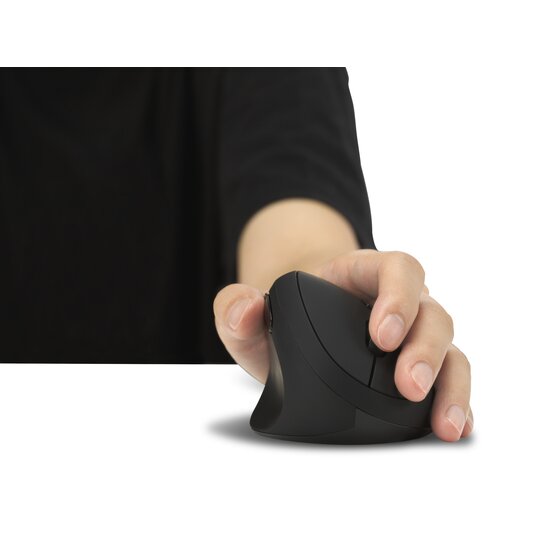
The Kensington Pro Fit Ergo Vertical Trackball is one of the few left-handed trackball mice available. Unlike traditional mice, it uses a thumb-operated trackball to move the cursor, reducing wrist movement and offering precise control. Its vertical design adds ergonomic support, making it a strong option for users who want comfort and productivity in one package.
Features & Performance
- Thumb-operated trackball: Smooth, accurate cursor control without moving the mouse.
- Vertical ergonomic design: Keeps the wrist in a natural handshake position.
- Dual wireless connectivity: Switch between Bluetooth and USB receiver.
- Customizable buttons: Nine programmable buttons for shortcuts and macros.
- Adjustable DPI: Choose between 400, 800, or 1500 DPI for precision or speed.
- Rechargeable battery: USB-C charging eliminates the need for disposable batteries.
- Mac compatibility: Works seamlessly on macOS, with customization available through KensingtonWorks software.
Performance is excellent for productivity tasks. The trackball offers precise control, especially useful for design work, spreadsheets, or users with limited desk space. The dual wireless connectivity makes it versatile, and the rechargeable battery is a welcome upgrade compared to AA-powered models.
Why We Liked It / User Experience
The Pro Fit Ergo feels premium and practical. For left-handed users, it’s a rare combination: vertical ergonomics plus a trackball. This means less wrist strain, smoother navigation, and more control. The customizable buttons add efficiency, letting you tailor the mouse to your workflow.
It’s especially useful for professionals who spend long hours at the computer. Compared to vertical mice like the Logitech Lift or Perixx PERIMICE-713L, the Kensington stands out because of its trackball design and rechargeable battery. You’d prefer this mouse if you want comfort, precision, and modern wireless features in a left-handed trackball.
✅ Pros
- True left-handed vertical trackball design
- Reduces wrist movement and strain
- Dual wireless connectivity (Bluetooth + USB receiver)
- Rechargeable via USB-C
- Nine programmable buttons for productivity
- Mac-compatible with KensingtonWorks software
❌ Cons
- Bulkier than standard mice
- Learning curve if you’ve never used a trackball
- Higher price compared to budget ergonomic models
Verdict
The Kensington Pro Fit Ergo Vertical Wireless Trackball (Left-Handed) is a standout option for left-handed users who want both ergonomic comfort and trackball precision. Its rechargeable battery, dual wireless connectivity, and customizable buttons make it one of the most versatile left-handed mice available. If you’re looking for a premium productivity tool, this mouse is worth the investment.
Review Author – Metin Karal
Metin Karal is a Computer Engineer and He is interested in reviewing products that He used or liked. He also likes programming in C#. Currently, He is developing a really challenging memory game, PairMem which is available at Official Microsoft Store for free download.

Pingback: Logitech M330 Silent Mouse Review | Trusted Reviews
Pingback: Best Left-Handed Scissors for School and Office